Cabin terminal
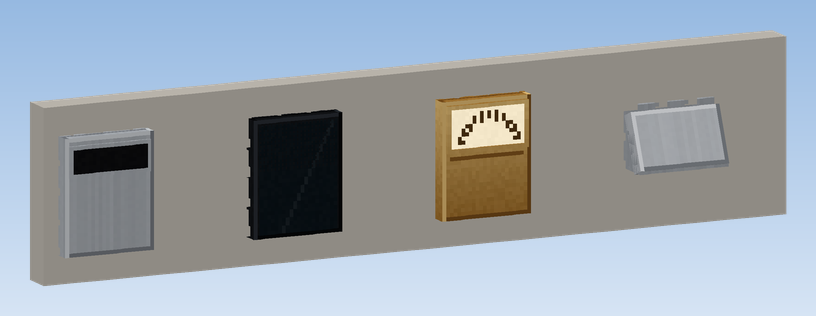
The Cabin Terminal is the operating panel inside the car. It shows where the car is and lets passengers choose a floor, hold or close the doors and raise the alarm.
| Terminal | Look | Floor buttons on the panel |
|---|---|---|
| Cabin Terminal (Button Panel) | steel plate, display strip, square buttons, lowest floor bottom left | up to 9 |
| Cabin Terminal (Touchscreen) | black glass with a list of floors you tap, highest floor on top | up to 6 |
| Cabin Terminal (Brass Dial) | brass plate with a pointer dial and round buttons | up to 6 |
| Cabin Terminal (Station Console) | sloped console at handrail height as in German railway station elevators, round steel buttons with a green light ring, yellow emergency button | up to 8 |
With more floors than buttons, the panel shows the floors around the car's current floor. All floors are always reachable through the window.
Placing
Place the terminal on an inside wall of the cabin and glue it to the car with Super Glue. It sits flat on the wall, facing you; on a thin wall it moves back onto its surface.
Using the panel
Click the buttons directly on the panel, even while the car is moving:
| Button | Does |
|---|---|
| floor button | stores a call to that floor; the button lights up |
| door open | opens the doors again while they close, or keeps them open longer |
| door close | starts closing straight away |
| alarm | rings a bell and calls players within 48 blocks, see Faults and rescue |
The display shows the current floor and the direction of travel. The Brass Dial's pointer moves along with the car.
The window
Click the display of the terminal, or click it while sneaking, to open the window. On the Station Console, which has no display, sneak and click.
- A status line at the top: "Waiting at …", "On the way, at …", "Doors open at …" or "Out of order".
- Every floor with its short and long name, highest floor on top.
▶marks the floor the car is at,●a floor already chosen. Click a floor to choose it. - With more than eight floors,
▲and▼at the top turn the pages. - At the bottom: Open door, Close door and Alarm.
The values of this elevator:
| Field | Meaning |
|---|---|
| Doors stay open (s) | how long the doors stay fully open |
| Door travel time (s) | how long opening and closing take |
| Minimum braking distance (blocks) | how far ahead a call must be to be served on the way |
| Fault after (s) | how long without drive between floors until a fault |
| Stuck after (s) | how long the car may stand still with drive until it counts as stuck |
| Keep cabin calls after a fault | cabin calls survive a breakdown |
| Chime on arrival | gong on arrival |
Save stores them for this elevator ("This elevator uses its own settings"). Use global values goes back to the values from the config file. Times may be 0 to 3600 seconds, the braking distance 0 to 64 blocks; otherwise the window says "Please enter valid numbers". A dot or a comma both work as decimal separator.
The settings take effect at once and are stored with the world. Their meaning is explained under Settings.