Your first elevator
This guide builds one elevator over three floors with everything the mod offers. The parts from Create are built as usual; the new blocks are only added.
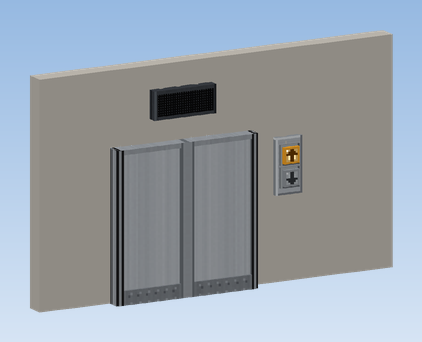
Build the shaft and the pulley
Build a shaft at least two blocks wide if you want a centre opening door. Place Create's Elevator Pulley at the top and give it rotation, for example with a motor or a shaft from your drive.
Build the cabin
Below the pulley, build the cabin floor and walls. Put a Redstone Contact on the outside of the cabin, facing the shaft wall. Glue everything that belongs to the car together with Super Glue.
Put a contact on every floor
On every floor, place a Redstone Contact in the shaft wall exactly opposite the cabin's contact, so they meet when the car stands at that floor.
Fit the cabin doors
Place an Elevator Door in the cabin wall where people get in. Two doors side by side make a centre opening door. Glue them to the cabin.
Fit terminal and light
Put a Cabin Terminal on an inside wall and a Cabin Light on the ceiling. Both must be glued to the car. A Floor Indicator or Hall Lantern inside the cabin is optional.
Set the landing doors
On every floor, place an Elevator Door directly in front of the cabin door, of the same width. It is the landing door: the cabin door opens it whenever the car stands there.
Add a call panel
Next to each landing door, place an Up/Down Call Panel on the wall. On the top and bottom floor a single Call Button is enough. Buttons find the elevator contact next to them by themselves (up to 4 blocks to the side and 3 up or down); no linking is needed.
Add indicators
Above each landing door, place a Floor Indicator or a Hall Lantern. Above a double door, click near the edge of the block so it sits centred over both leaves.
Assemble
Right-click the Elevator Pulley. Create assembles the cabin and turns the contacts into Elevator Contacts.
Name the floors
Right-click a floor's Elevator Contact and enter a short name (up to 4 characters, e.g. EG, 1, 2) and a
long name (e.g. Lobby). Buttons and indicators use the short name, the terminal window the long name.
Try it out
- Press the call buttons on all three floors in quick succession. The car serves them one after the other without turning around in between.
- Get in and choose a floor on the terminal. The doors close first, then the car leaves.
- Stand in the doorway while the doors close: they open again.
- Take the drive away during a trip: the elevator goes out of order and the cabin light switches to the emergency light. Give rotation back and the car moves to the nearest floor.