Getting Started
Overview
What Create Managed Elevators does to Create's elevators, which blocks it adds and where to find what in this wiki.
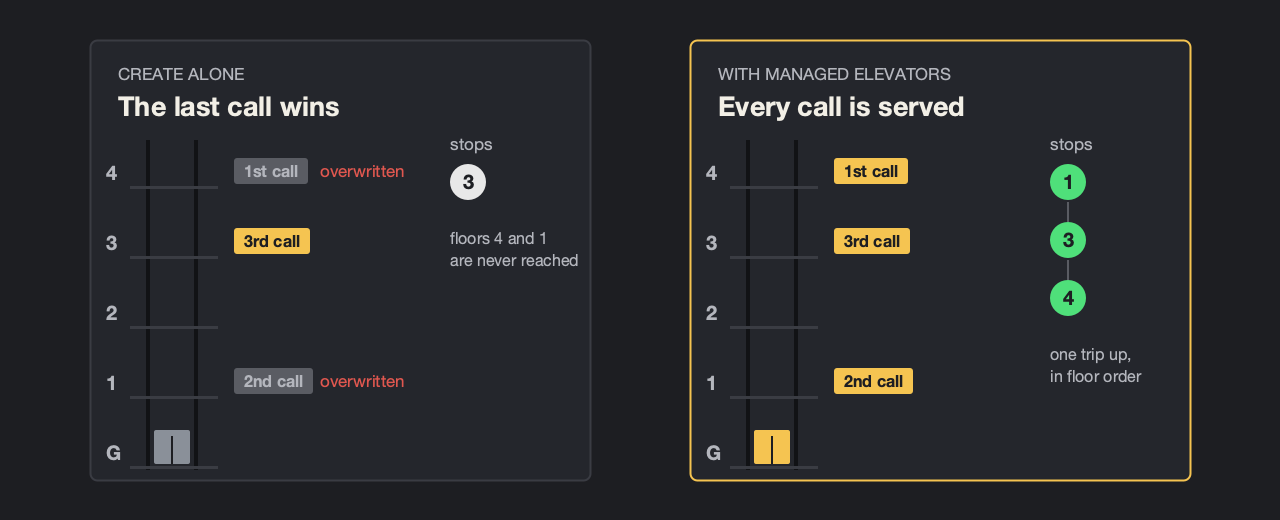
Create Managed Elevators (CME) is an addon for Create 6 that turns Create's elevators into real ones. In Create, an elevator has exactly one target: the last call wins and even overrides a trip that is already under way. CME puts a proper elevator controller in front of it. Every call is remembered and served in order, the doors open and close at every floor, and several elevators side by side work as a group.
It works with ordinary Create elevators: the elevator pulley, the contacts and the Contraption Controls stay as they are. You do not have to rebuild anything; every new block is an addition.
What changes
| Area | In short |
|---|---|
| Call memory | Every call is kept, whether it comes from redstone at a contact, the Contraption Controls, a call button or the cabin terminal. |
| Collective control | The car keeps its direction while there are calls ahead and picks up calls on the way if it can still stop in time. |
| Door sequence | At each floor the doors open, stay open a few seconds and close; only then does the car leave. Someone in the doorway makes them open again. |
| Groups | A call panel between several shafts sends the car that gets there best. If one breaks down, another takes over. |
| Faults | Without drive or stuck between floors the elevator goes out of order and, once the drive is back, first moves to the nearest floor. |
| Floor display | Create's Display Link source Elevator Location now updates on every arrival, not only when the elevator is assembled. |
New blocks
| Block | Designs |
|---|---|
| Call Button and Up/Down Call Panel | Steel, Brass, Industrial, Glass Touch |
| Elevator Door | Steel, Telescopic, Scissor Gate (Brass), Glass |
| Cabin Terminal | Button Panel, Touchscreen, Brass Dial, Station Console |
| Floor Indicator | 7 Segment, Dot Matrix, Brass Dial |
| Hall Lantern | one design |
| Cabin Light | LED Panel, Spot, Brass Pendant |
On top of that come three Display Link sources on Create's elevator contact: floor name, direction and status.
The chapters of this wiki
Operation
How the controller decides: call memory, door sequence, groups, faults, chime and switching off.
Where to start
- Install the mod: Installation.
- Build a complete elevator: Your first elevator.
- Read up on Operation to understand what the car does and why.