Blocks
Floor indicators
7 Segment, Dot Matrix and Brass Dial floor indicators, on the floor and in the cabin, and how to centre them over a double door.
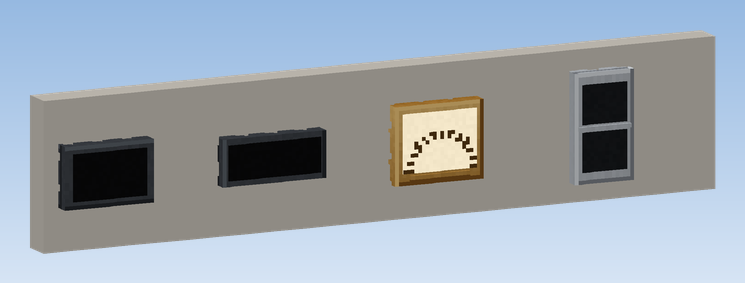
Floor indicators show where the car is and which way it goes.
| Indicator | Shows |
|---|---|
| Floor Indicator (7 Segment) | red digits of the floor's short name (up to 3 characters, right aligned, unlit segments visible) and an up and a down arrow |
| Floor Indicator (Dot Matrix) | amber dot matrix with the floor's short name and a direction arrow |
| Floor Indicator (Brass Dial) | brass dial with a pointer that moves over the floors |
On the floor or in the cabin
- On the floor, an indicator shows the car of the shaft next to it: the nearest running elevator whose floor contacts are within 6 blocks to the side. Above each landing door of a group, every indicator shows its own car.
- In the cabin, glued to the car, it shows its own car.
Placing above a double door
An indicator is one block wide, a double door two. To centre it over both leaves:
- when placing: click near the left or right edge of the block (the outer quarter). The indicator then sits half a block towards that edge.
- afterwards: click it with Create's Wrench. Each click moves it on: centre, left, right.
What it shows when
| State | 7 Segment | Dot Matrix |
|---|---|---|
| in service | floor and direction | floor and direction |
| between floors | the nearest floor | the nearest floor |
| out of order | blinking Er | blinking FAULT |
| switched off | only the unlit segments | dark |
Indicators glow a little, so they can be read in a dark hallway. For a display board or Nixie tubes, use the
Display Link sources.