The parts
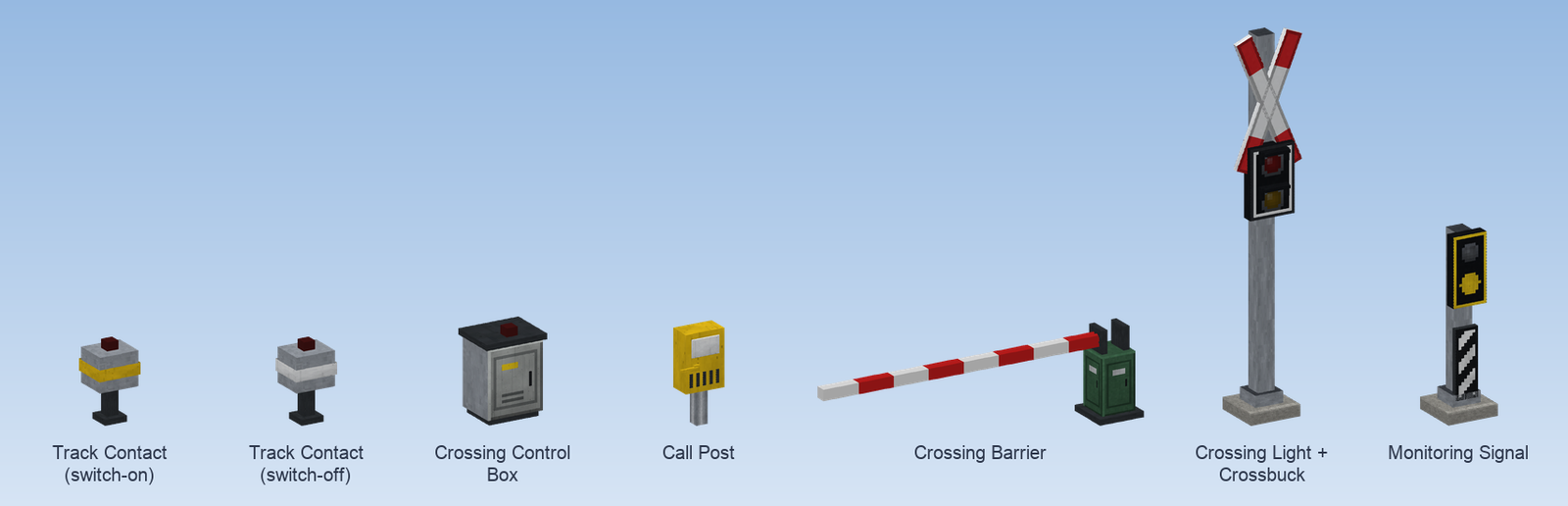
Crossing Control Box
The control box runs the crossing. Contacts, barriers, lights, monitoring signals and call posts are connected to it with the connection cable; a crossing over several tracks still has only one box.
- Right click with an empty hand shows how many contacts and how many barriers and signals are connected.
- Right click with Create's wrench opens the settings; see Timings and settings.
- It gives off a redstone signal while the crossing is secured.
- It only works while its area is loaded.
Track Contact
An axle counter at the rail. It reports exactly the train standing over its piece of track; a train on the neighbouring track does not trigger it.
It is placed like a Create signal or station: with the contact in your hand click the track first, then place the box beside it, at most 16 blocks away. The contact itself then lies on the track, and an axle counter sits at the rail on the side of the box. Only track blocks can be clicked, not freely curved track. Sneak and right click into the air to discard the track selection.
Right click the box with Create's wrench (management right needed) to switch its role:
| Role | Band on the box | Where | Effect |
|---|---|---|---|
| Switch-on contact | yellow | in front of the crossing, one in each direction | Secures the crossing as soon as a train reaches it. The further away, the earlier. |
| Switch-off contact | white | right at the crossing | Releases the crossing as soon as the end of the train has left it. |
The box carries an indicator lamp and gives off a redstone signal while a train stands over the contact.
Crossing Barrier
The block is the barrier drive at the roadside; the boom points the way you look when you place it. With Create's wrench you set:
| Setting | Choices |
|---|---|
| Boom length | 2 to 8 blocks (default 4) |
| Hanging skirt | on or off: a lattice that hangs from the boom |
| Paint | red and white, short fields / red and white, long fields (older type) / white with red bands / yellow and black |
The two modern paints have stay wires and a pendulum prop from a boom length of 4 blocks.
A closed barrier holds you up: under the lowered boom lies an invisible obstacle that you can neither walk through nor jump over. It is only placed in free air; where a block is in the way, a gap remains.
Crossing Light
The light for road traffic: a black screen with a white border, red at the top, yellow below. Placed on a Signal Mast it stands; placed against the underside of a block it hangs. The mast runs through the light, so the Crossbuck fits on top.
Crossbuck
The red and white St Andrew's cross. It stands upright like the real one and reaches beyond its block, so leave room above it. Put it on top of the crossing light's mast. It is a sign and does not need to be connected.
Crossing Monitoring Signal
The signal for the train driver. It stands on a Signal Mast at the track in front of the crossing; the mast piece below gets the black and white striped mast sign by itself. Built after the signal book:
| Aspect | Shows | Meaning |
|---|---|---|
| Bü 0 | yellow disc in a yellow frame, no white light | Stop in front of the crossing! (the crossing is not secured) |
| Bü 1 | white light flashing above the disc | Crossing may be passed: barriers are down. |
Right click with Create's wrench to switch the form:
| Form | Note |
|---|---|
| Monitoring signal: yellow disc | today's DB form |
| Monitoring signal: two yellow lights | former DR form; the yellow lights burn steadily |
| Monitoring signal: one yellow light (DS 301) | the yellow light burns steadily |
It is a display only and does not hold trains. Matching extra boards are in the Bü Sign: the white triangle when the signal stands closer than braking distance, and the black board with white disc at a repeater.
Call Post
A yellow box with a lever, as on German on-call crossings ("barrier opens on request, please press the lever"). It belongs to a crossing in Call barrier mode and is connected to the control box with the connection cable. A right click pulls the lever; what happens then is described under Timings and settings.
Connection Cable
Connects everything to the control box:
- Click the control box first. The cable remembers it and glints.
- Then click every contact, barrier, light, monitoring signal and call post that belongs to it. A second click on a part disconnects it again.
- Sneak and right click into the air to forget the control box.
- The cable is not used up. The parts must be within the connection range of the control box (64 blocks by default, adjustable from 32 to 256).
The chat tells you after each click how many contacts and how many barriers and signals are connected.
Overview
Level crossings that work like the real thing - axle counters on the track, a control box, barriers, crossing lights, a bell, the monitoring signal and on-call crossings.
Building a crossing
Step by step from the control box to the first train - where the contacts go, how to connect everything and what to check.