Lines & Schedules
Overview
How Create Managed Railways keeps one schedule per CRN line and writes it into all trains of that line.
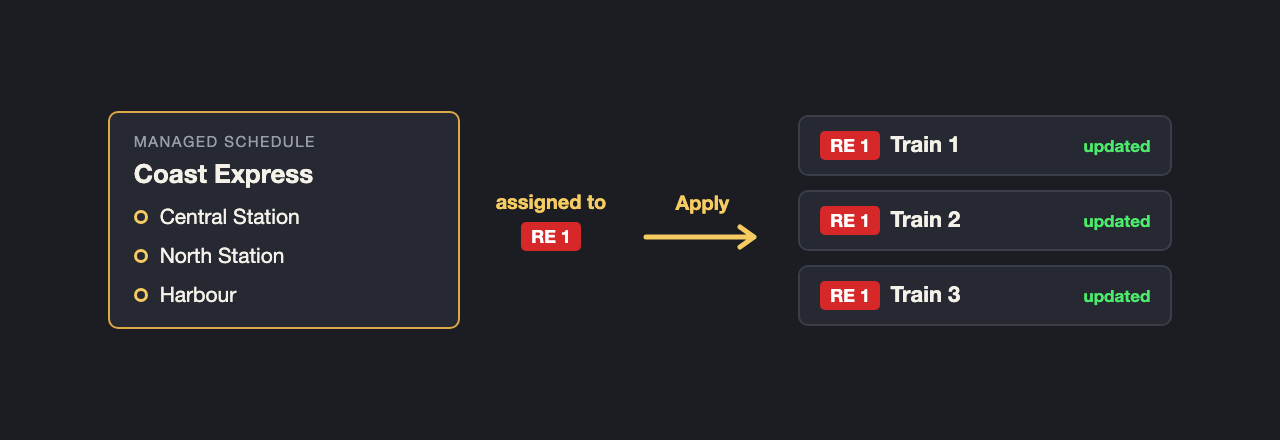
In Create every train has its own schedule. Change a stop, and you have to change it in every train. Create Managed Railways turns this round: you keep one schedule per line in one place, and the mod writes it into all trains of that line.
The basic terms
| Term | Meaning |
|---|---|
| Line | A train line from Create Railways Navigator (name, colour, owner). You create lines in CRN's Global Settings as before; CMR only refers to them. |
| Section | A train belongs to a line because its schedule contains CRN's Travel Section entry with that line. Everything up to the next such entry is the line's section. A train can run several lines one after the other. |
| Managed schedule | A named schedule that belongs to no train. You assign it to a line; the same schedule may be assigned to several lines. |
| Apply | Writes the schedule into the trains. In each train only the section of that line is replaced, other sections stay as they are. The train finds its place again by its next destination. |
| Effective schedule | What is actually written: base schedule + extra stops - closed stations. The managed schedule itself is never changed by closures. |
How it works
- You build a schedule, in the window or as a Create schedule item, and store it as a managed schedule.
- You assign it to a CRN line, optionally with a second schedule for the night.
- You apply it: every train of the line gets the effective schedule.
- For construction work or disruptions you close stations, add extra stops or switch on whole profiles. These are only noted at first; the trains change when you apply again, or at once if you want it so.
Applying never changes a train that is not on the line. Add train is the only button that takes a new train onto a
line, and it replaces that train's whole schedule.
Pages in this chapter
Good to know
- Everything the window can do also works by command, with the same permissions and the same log: see Commands.
- Trains still need a driver to run by schedule.
- After a schedule change CRN learns the travel times of the train anew, so its displays may be inaccurate for a short while.
- CRN only lists trains whose data is already reliable. A new train may appear at its line only after a while.