ETCS modes and DMI
Modes
| Mode | Name | What it means | Speed supervised |
|---|---|---|---|
| SB | Stand by | ETCS switched on in a level-2 area, but no radio contact yet; no authority. | – |
| FS | Full supervision | Movement authority and speed profile from the radio block centre or a balise. | braking curves |
| OS | On sight | Into an occupied section after the driver's acknowledgement, ready to stop short of anything. | 30 km/h |
| SR | Staff responsible | Past a signal at stop on an order from the dispatcher. | 40 km/h |
| SH | Shunting | No authority, only the shunting speed is supervised. | 40 km/h |
| TR | Trip | The end of the authority was passed: emergency brake to a stand. | – |
| PT | Post trip | At a stand after a trip, held until an order. | – |
| UN | Unfitted | Level 0, outside ETCS; PZB protects the train. | – |
Trip and order
Trip
A train in FS or OS passes the end of its movement authority: emergency brake (TR), "ETCS emergency brake: end of the movement authority passed".
Post trip
Once it stands, it is held (PT): "ETCS: train stands, it may only go on with an order".
Order over the radio
The driver calls the dispatcher over the train radio. The dispatcher (or the automatic dispatcher) gives an order for this signal.
Staff responsible
The train passes the signal in SR at no more than 40 km/h: "ETCS: running on an order, at most 40 km/h".
Full supervision again
Behind the signal of the order it is back in FS with its next authority.
An order also works for a train standing in FS right in front of the end of its authority, without a trip first.
On sight (OS)
When the authority ends in front of an occupied section (not a locked one) and the train stands close to its end, the full DMI offers Acknowledge on sight. Pressed, the train may run into the section at no more than 30 km/h. Once it is through and alone again, it is back in full supervision.
Shunting (SH)
At a stand (not after a trip, and not where ETCS is switched off), the full DMI offers Shunting. Only 40 km/h is supervised, there is no authority. End shunting ends it; the old authority no longer holds, so on level 2 the train waits in SB for a new one, on level 1 it runs as UN until the next balise.
The small DMI
The ETCS Display (DMI) in the console shows on its small screen:
- the speed: white, orange above the permitted speed, red while ETCS brakes,
- the permitted speed,
- the next target with its distance,
- mode and level,
- on the left a bar that gets shorter towards the target.
"ETCS off" means ETCS is switched off in this area. Without ETCS on the train it works as a plain speedometer.
The full DMI
A click on the ETCS Display opens the full view, laid out like the real DMI:
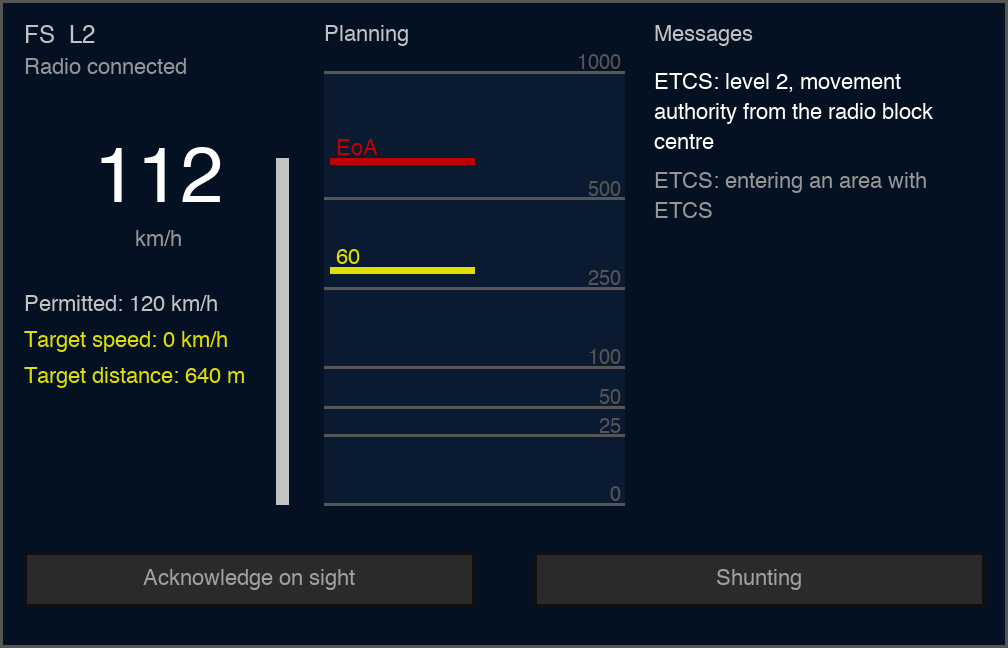
- Left: mode and level ("FS L2"), radio contact, the speed in large (in the colour of the supervision), permitted speed, target speed and target distance, and the distance bar.
- Middle, planning area: the train at the bottom, the speed changes ahead above it, up to 1000 m; near distances get more room. Each change is a yellow line with its speed, the end of the authority a red line "EoA".
- Right, messages: the latest ETCS messages, newest first.
- Below: the buttons Acknowledge on sight and Shunting / End shunting, active only when allowed.
The view updates twice a second; every button press is checked on the server.