Train radio
On a real German railway, drivers and dispatchers talk to each other over GSM-R, the digital train radio. Create Managed Railways brings this to your world: a driver stopped at a red signal calls the signal box, the dispatcher answers and gives an order to pass the signal, and an emergency call stops every train around.
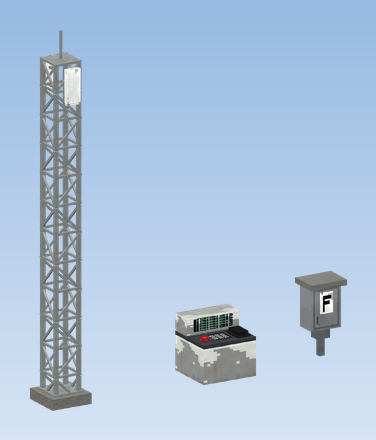
What belongs to it
| Item | Where | What it does |
|---|---|---|
| GSM-R Radio Mast | lineside | Provides the radio network in a circle around it. |
| Dispatcher Radio Desk | signal box | The dispatcher's radio: calls, group calls, messages, orders. |
| Cab Radio | driver's console | The train's radio. The train becomes a radio subscriber. |
| GSM-R Handheld Radio | inventory | Radio away from the cab, for shunters or a dispatcher on the move. |
| Signal Telephone | at a signal | Wired line to the signal box, works without a mast. |
What you can do with it
- Calls between a train, a handheld radio, a radio desk and a signal telephone, and group calls from the dispatcher to everybody in the area.
- Fixed messages such as "Stopped at signal" or "Proceed", also without a call.
- An emergency call from any radio that stops the trains around.
- Orders: the dispatcher lets a train pass a signal at stop. This also gets it past a locked signal, the PZB magnet and an ETCS trip.
- An automatic dispatcher answers where no desk is staffed, so a single player is never stuck.
- Real voice through Simple Voice Chat (optional), otherwise the chat goes over the radio.
Quick start
Put up a mast
Stack a few GSM-R Radio Mast pieces near the line. The bottom piece gets the foundation and the top piece the antennas by themselves. A right click on the mast sets its range. See Radio masts.
Fit the train
Click a half of the train's Driver's Console with a Cab Radio. Off the train, carry a GSM-R Handheld Radio instead.
Staff the signal box
Place a Dispatcher Radio Desk in the signal box. Sneak and right-click it with an empty hand to give it a control area, or leave it without one: then it serves the trains within 512 blocks.
Talk
On the train press G to open the radio, pick someone under Reachable and press Call. Answer an incoming call with J.