Driver's console
The Driver's Console is the cab of a train, built as a kit. You place the empty console and fit it with the devices you want. With a Driving Lever it replaces Create's Train Controls: Create then assembles the train without its own controls block, and a right click on the lever takes over the train. You drive with the same keys as with Create. Without a driving lever the console is display and switches only and needs Create's controls beside it.
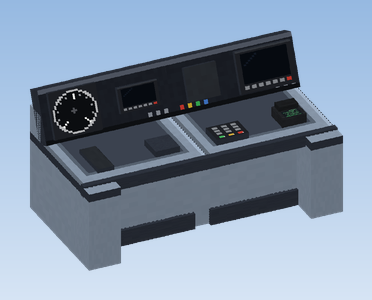
Building the console
Place it
Place the Driver's Console so that it faces the driver, like Create's Train Controls. The seat (for example the Driver's Seat) goes in front of it.
Make it wider
Several consoles side by side form one wide desk. Click an empty console with Create's wrench to switch its shape: straight, left end or right end (the ends have a wing towards the driver).
Fit the devices
Hold a device and click the half of the console where you want it. Left and right count from the driver's seat.
Take devices out
Click a half with the wrench: first the device on the desk comes out, then the display.
Six slots per block
| Slot | Place | Takes |
|---|---|---|
| Display, left and right | the sloped panel at the top | Round Speedometer, Digital Speedometer, Console Clock, Signal Indicator, Timetable Display, Pantograph Indicator, ETCS Display (DMI) |
| Desk, left and right | the desk top | Driving Lever, Exterior Light Switch, Interior Light Switch, Horn Button, Pantograph Switch, Vigilance Device, Brake Lever, Cab Radio |
| Front wall, left and right | the wall below the desk, towards the driver's knees | every desk device except the Driving Lever, plus the PZB Panel and the Uncoupling Button, which fit only here |
Click the front wall below the desk to fit a device there. A slot that is taken says "This slot is taken".
The devices
Displays
| Device | On the running train |
|---|---|
| Round Speedometer | A needle shows the speed (scale up to 160 km/h; one block is one metre). Under a limit from a signal or speed board, a yellow mark shows the permitted speed. |
| Digital Speedometer | The speed as a number, with the permitted speed below in yellow while a limit applies. |
| Console Clock | The time of day of the world. |
| Signal Indicator | Red while the train waits at a signal showing stop, otherwise green. |
| Timetable Display | The next stop, below it the distance or, when late, the delay. |
| Pantograph Indicator | Green: released (rises under a wire); yellow: lowered by hand; dark: the train has no pantograph. |
| ETCS Display (DMI) | The ETCS display; a click opens the large view. See Train protection. |
Desk devices
| Device | Right click on the running train |
|---|---|
| Driving Lever | Makes the console the cab. Takes over the train, or hands it back. The lever itself does not move yet. |
| Exterior Light Switch | Head and tail lights: automatic (always on) → always on → off. |
| Interior Light Switch | Interior lights: automatic (on when dark) → always on → off. Sneaking changes their colour. |
| Horn Button | Sounds the horn. |
| Pantograph Switch | Lowers the pantographs by hand, a second click releases them again. |
| Vigilance Device | The Sifa: acknowledge it regularly while driving by hand. |
| Brake Lever | For show: it moves with the train's braking but controls nothing. |
| Cab Radio | Opens the train radio. See Train radio. |
Front wall devices
| Device | What it does |
|---|---|
| PZB Panel | The PZB lamps 55, 70, 85, 1000 Hz, 500 Hz and Befehl. A click is Wachsam, a sneak-click Frei. |
| Uncoupling Button | Opens the nearest Scharfenberg coupler. See Couplers. |
On the running train a right click works the device on the half you are aiming at. A right click on a half without a control gives the full status of the train in the chat: line, next stop, distance, delay and top speed. The small displays shorten long names a lot, the chat line does not.
Lights and pantograph
- The train keeps exterior and interior light settings apart. Without a switch, both run automatic.
- Pantographs come from the optional mod "Pantographs and Wires". Every train raises its pantographs by itself wherever there is a wire, also trains on a schedule with nobody on board. The Pantograph Switch lowers them by hand, and the train remembers that. Without the mod the switch only reports "This train has no pantograph".
Sifa and PZB
The Vigilance Device has to be acknowledged every 30 seconds while the train is driven by hand, by a click or the key V. Miss it and a warning sounds, then the train brakes until you react. PZB needs a Train Protection Cabinet on the train as well. Everything about it in Train protection.
All keyboard shortcuts of the console: Train keys.