Switching signals
Some signs are real signals with a housing, hoods and lamps, and they switch: the additional signals (Zs) and the shunting signals (Sh). They come from the Zs Signal and Sh Signal items and are picked in the same selection window as all sign boards.
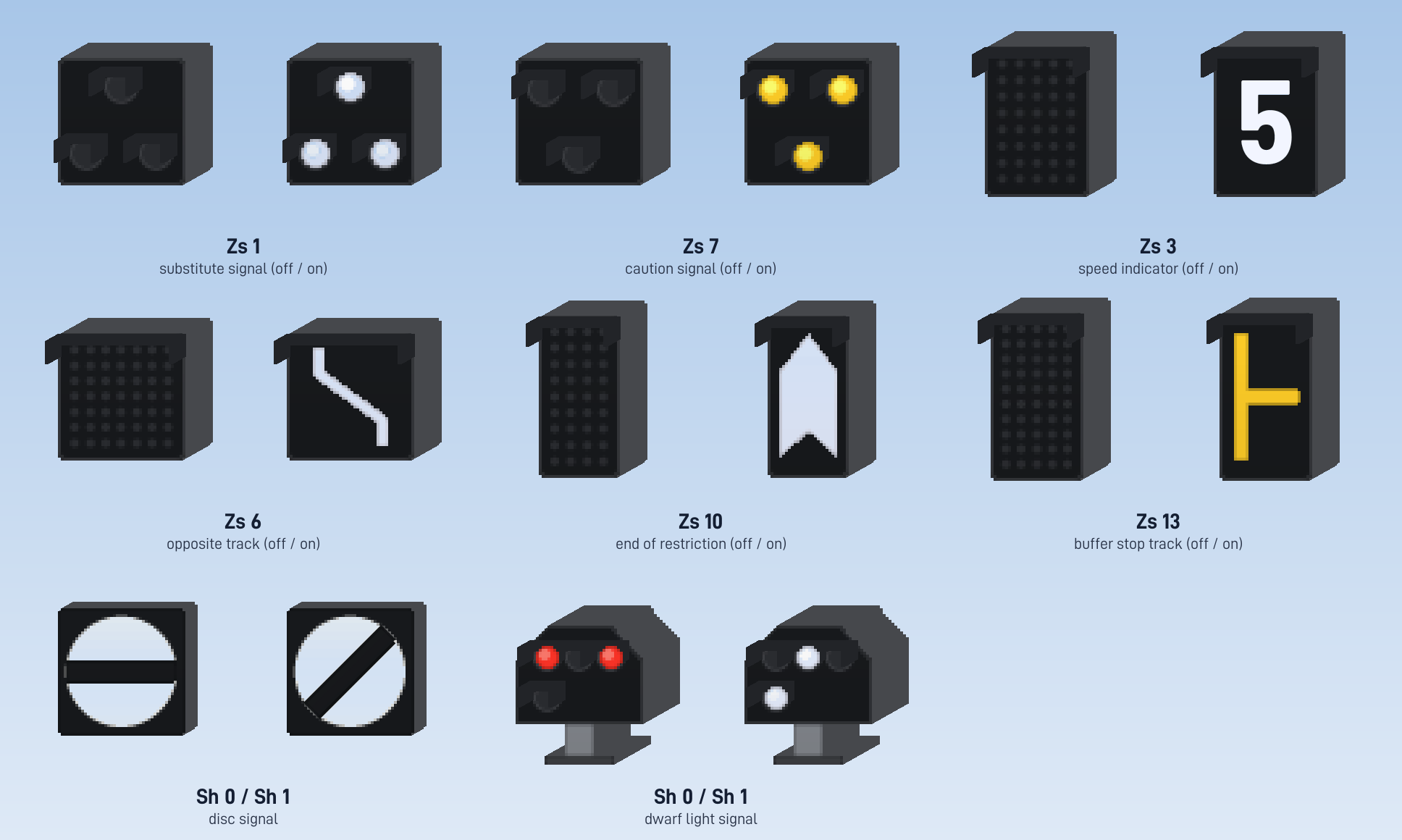
Lit lamps carry a halo in their colour, and a signal only gives off light while one of its lamps burns.
Which signal they follow
A switching signal looks for the signal it belongs to by itself:
- A light signal on the same mast, above or below it. Put the Zs signal on the mast pieces under or over the light signal.
- Otherwise a Create signal up to three blocks from the foot of its mast, as the light signal does.
When they light up
| Signal | Lights up when | Meaning |
|---|---|---|
| Zs 1 Substitute Signal | the signal box gives a substitute signal; the main signal stays at stop | Pass the signal at stop without a written order. |
| Zs 7 Caution Signal | the same | Pass the signal at stop and go on at sight. |
| Zs 8 Wrong Line Substitute Signal (flashing) | the same | Pass the signal at stop onto the opposite track. |
| Zs 2 Direction Indicator | the signal shows proceed | The route leads in the direction of the letter. |
| Zs 2v Advance Direction Indicator | the signal shows proceed | Expect Zs 2 at the next signal. |
| Zs 3 Speed Indicator (light) | the signal shows proceed | Speed digit, × 10 km/h. |
| Zs 3v Advance Speed Indicator (light) | the signal shows proceed | Expect this Zs 3 at the next signal. |
| Zs 6 Wrong Line Indicator (light) | the signal shows proceed | The route leads onto the opposite track. |
| Zs 10 End Signal (light) | the signal shows proceed | End of the speed restriction. |
| Zs 13 Dead End and Early Stop Indicator (light) | the signal shows proceed | The route leads into a dead end or a shortened track. |
| Sh 0 / Sh 1 Disc Signal or Dwarf Light Signal | the signal shows proceed | Sh 0: stop, no movement. Sh 1: movement allowed. |
"Proceed" here means green or yellow, so a Zs signal also lights when the next section is occupied.
The letter of Zs 2 and the digit of Zs 3 are set as Lettering in the selection window. Zs 3 and Zs 3v as switching signs only show the digit. The light signal's own speed indicator is what limits trains; see Light signal.
Operating mode
Every switching signal has an Operation mode:
| Mode | Behaviour |
|---|---|
| Automatic | Switches with its signal or with the substitute signal, as above. |
| On (manual) | Stays lit or at proceed (Sh 1). |
| Off (manual) | Stays dark or at stop (Sh 0). |
You can set it in four places:
- At the block: right click with Create's wrench and choose under Operation.
- In the signal box: in the Signals tab, which also changes the lettering.
- On the track map: click a shunting signal to cycle it: Sh 1, Sh 0 held, back to automatic.
- By a route: an active route holds its shunting signals at Sh 1. An entry-exit route sets the shunting signals along its path by itself. This comes before the manual setting. See Interlocking.
Choosing Automatic again releases a signal that was set by hand.
Switch and departure signals
Two more families switch on their own, without a light signal:
- Wn Signal (switch signals) stands next to a switch and shows which way it lies. Create has no switch blades, so the lantern reads it from the trains: it turns to the branch the next train will take and stays there afterwards, like a real switch. Wn 1 / Wn 2 exists as a lantern with a turning white bar and as a light signal; Wn 3 to Wn 7 are fixed signs.
- Zp Signal (departure signals) finds the station nearby and reads the waiting time of the train standing there from its schedule: Zp 10 (close doors) lights a few seconds before departure, then Zp 9 (depart) until the train has left. If the train waits for cargo or redstone instead of a time, Zp 9 lights the moment it leaves. The brake test signals Zp 6, Zp 7 and Zp 8 are fixed.
Sign boards
More than a hundred signs from the German signal book in one item per category - Ne, Ra, El, Ts, Bü, Lf, mast signs and orientation signs - picked from a selection window.
Speed boards
The Speed Board limits trains passing its piece of track as Lf 7, Lf 2 or Lf 3; the Lf signs Lf 1 and Lf 6 announce it.