Light signal
The Light Signal is the large display for a Create signal, built after the Ks signals of Deutsche Bahn: a narrow black screen with red (top), green (left) and yellow (right) under long hoods, the box of the speed indicator above, the advance speed indicator below and the white name plate under it. Its lamps shine regardless of daylight and carry a faint halo, so you see them from far away at night.
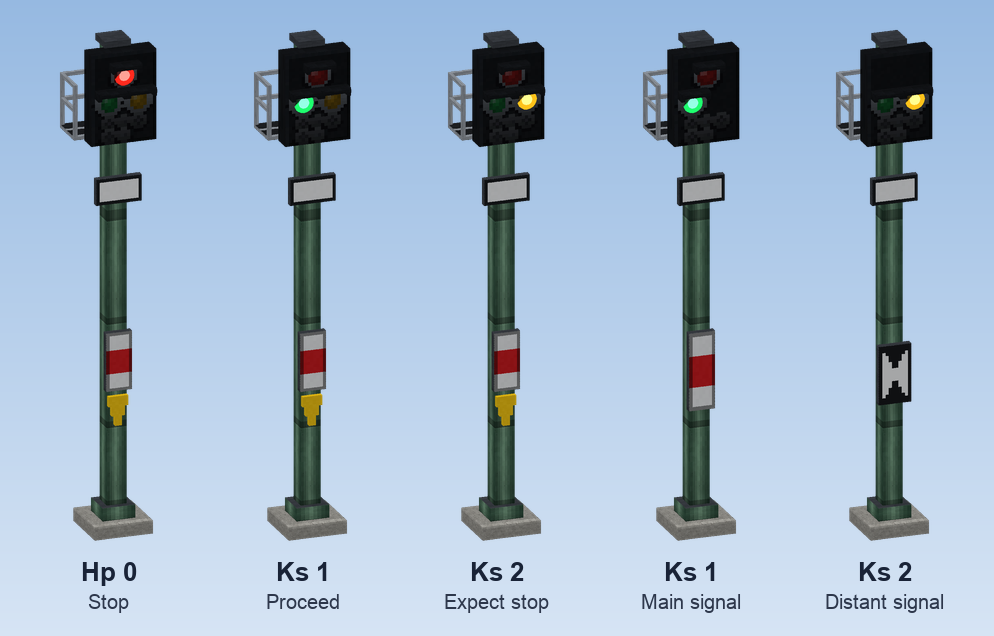
The block is two blocks tall. Besides the Ks system it can show H/V, Hl and semaphore signals; those are described under Signal systems.
Put one up
Place the Create signal
Put Create's Train Signal on the track as usual. It decides when trains stop; the light signal shows what it says.
Stack the mast
Beside the track, stack Signal Masts, for example three. The lowest piece gets a foundation by itself.
Place the light signal on top
Stand where the trains come from and place the Light Signal on the mast. The lamps face you. Mast and signal are now five blocks high, and the mast below carries the right mast sign by itself.
Connect it
If the foot of the mast is at most three blocks away from the Create signal, nothing more is needed: the light signal finds it on its own. Otherwise use a Display Link (see below).
Connecting it to a Create signal
There are three ways. The first one that applies wins.
| Way | How | Notes |
|---|---|---|
| Display Link on a Create signal | Put a Display Link on the Create signal and pick the light signal as its target. The source shows up as Signal State. | Any distance a Display Link reaches; switches without delay, because the link only sets up the connection. |
| Display Link on another source | Any Display Link source works: the text it sends is read. | red / halt, yellow / gelb, green / frei switch the matching lamp; a number 0 means green, anything above means red. |
| Nothing at all | Put the mast within three blocks of a Create signal. | The signal reads the nearest Create signal around the foot of its mast, like a Nixie tube on a signal. |
The display target has three lines to choose from in the Display Link:
| Line | What the link delivers |
|---|---|
| Signal aspect | The state of this signal (the usual choice). |
| Zs 3 digit | The speed digit, see below. |
| Distant signal (next signal) | What the next signal shows, see Distant signal line. |
GREEN, YELLOW, RED or INVALID.What the signal shows
| Create signal | Light signal |
|---|---|
| Green | Green |
| Yellow (next section occupied) | Yellow |
| Red, also when locked in the signal box | Red |
| Invalid | Red, flashing |
| No connection | Dark |
The Ks system has three types, chosen in the settings:
| Type | Lamps | Aspects | Mast sign |
|---|---|---|---|
| Ks combined signal | red, green, yellow | Hp 0, Ks 1, Ks 2 | white-red-white with yellow triangle |
| Ks main signal | red, green | Hp 0, Ks 1 | white-red-white |
| Ks distant signal | green, yellow | Ks 1, Ks 2 | distant signal board (Ne 2) |
Meaning after the signal book:
| Aspect | Light | Meaning |
|---|---|---|
| Hp 0 | red | Stop. |
| Ks 1 | green | Proceed. |
| Ks 1 flashing | green, flashing | Proceed; the advance speed indicator Zs 3v announces a lower speed at the next signal. |
| Ks 2 | yellow | Expect stop: the next signal shows stop. |
- A main signal has no yellow. Create's "proceed, next section occupied" shows as plain Ks 1 there.
- A distant signal has no red. It shows yellow when the Create signal it is connected to shows stop, otherwise green. So connect a distant signal to the Create signal it announces.
- The green lamp flashes as Ks 1 with Zs 3v only while the advance speed indicator shows a digit; Zs 3v itself lights only together with Ks 1.
Settings
Right click the signal with Create's wrench. Only players with the management right may change anything.
| Setting | What it does |
|---|---|
| Designation | The name on the plate, up to 11 characters. A space starts a second line, as on real signals: 63 P2. A light signal renamed in an anvil carries its name as soon as you place it. |
| Type | Ks combined, main or distant signal, or one of the H/V, Hl and semaphore types. |
| Speed indicator Zs 3 (top) | Switches the box above the screen on or off and sets its digit. |
| Advance speed indicator Zs 3v (bottom) | Switches the box below the screen on or off and sets its digit (1 to 9 or dark). Display only. |
| Extra light | White additional light: None, Shortened (shortened braking distance, top left) or Repeater (distant signal repeater, bottom left). |
A switched-off indicator disappears from the signal completely. Its digit stays stored, but has no effect.
The white extra light is a marker from the signal book. It lights only while the signal announces something: Ks 2, or Ks 1 with a digit on Zs 3v.
Speed limit with Zs 3
The box above the screen is the speed indicator Zs 3. Set a digit from 1 to 9 and it lights together with green or yellow. Every train that passes the connected Create signal in its direction is then limited to digit × 10 % of its top speed. That holds until another signal or speed board says something else.
| Setting | Effect |
|---|---|
| No limit set | The signal leaves trains alone. |
| Digit 1 to 9 | Limits to 10 to 90 %. The digit lights at the signal. |
| Clear the limit | Sets 100 % again. The indicator stays dark. |
- The limit works only when the light signal is connected to a Create signal (Display Link or at the mast foot). It then works even when that area is not loaded.
- Technically CMR sets the train's throttle, the same value Create's schedule instruction for the throttle sets. Both overwrite each other; whatever was set last applies.
- Changing digit: a second Display Link on the line Zs 3 digit can deliver the digit. The last number in its text counts: 1 to 9 limit, anything else lifts the limit. While it delivers, it overrides the fixed setting. If the digit changes while a train is still in the section behind the signal, the new value applies to it at once.
- The digits can also be set from the signal box, in the Signals tab.
Distant signal line
A distant signal normally shows yellow when the Create signal it is connected to shows stop. When it should announce a signal further ahead instead, give it a second Display Link on the line Distant signal (next signal), placed on the next Create signal (or any source whose text means red, yellow or green):
- A pure distant signal then shows exactly what the next signal says: Ks 2 for stop, otherwise Ks 1.
- A combined signal (or an H/V main signal with distant signal) stays at stop if its own Create signal says so. At proceed it shows Ks 2 when the next signal shows stop, otherwise Ks 1.
- If the next signal is not loaded or reports nothing, the signal trusts its own state.
Good to know
- With ETCS, light signals go dark in front of a train under supervision, as on a real ETCS line; trains without ETCS see them as usual. See Train protection.
- Locking a signal at stop, the substitute signal (Zs 1) and routes are handled in the signal box: Interlocking.
- On a wall, under a ceiling, diagonally or on a gantry: see Masts and mounting and Signal gantries.
Copying settings
In creative mode, Ctrl + pick block on a signal, speed board, lamp or station sign takes its settings along, so the copy is placed ready set up.
Signal systems
Besides Ks, the light signal can be an H/V light signal, an Hl signal of the former DR or a semaphore signal with moving wings.