Couplers
Create only knows a train as it was assembled at the station; two trains that touch derail. With couplers they become one train instead, and a train can be split again, by hand or by its schedule.
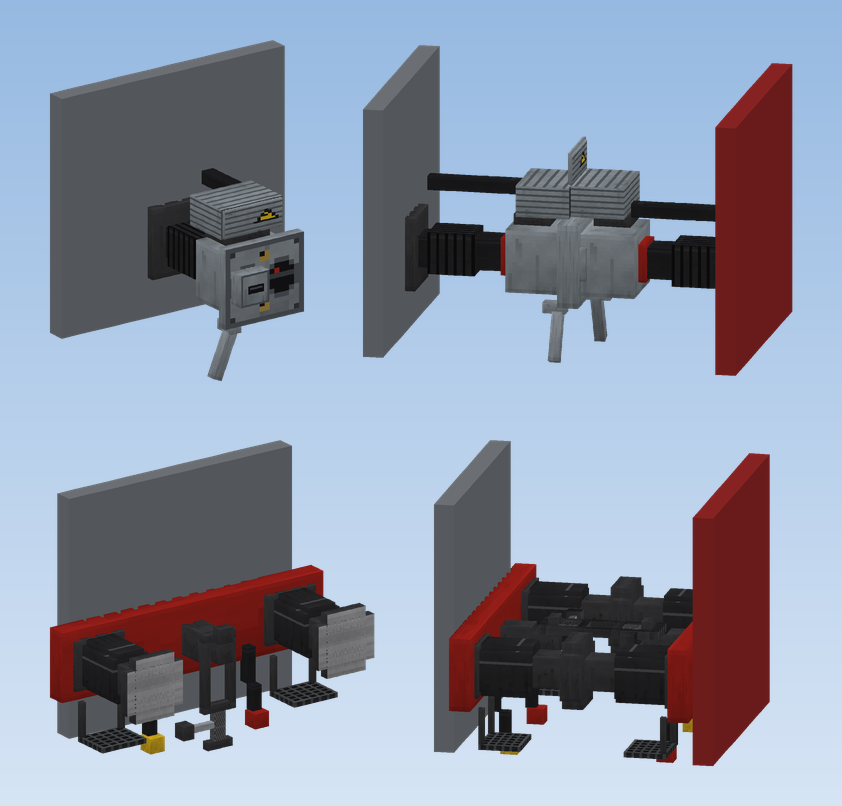
The two couplers
| Coupler | How it couples | Prototype |
|---|---|---|
| Scharfenberg Coupler | By itself when two trains meet slowly. The heads move out and the contact boxes open. | Multiple units (ICE, S-Bahn) |
| Screw Coupling with Buffers | The buffers stop both trains when they touch. Then click the coupling: the link is laid onto the other hook. | Locomotives and coaches |
Only couplers of the same kind couple with each other, and only slowly: both trains together at no more than 5 km/h. Faster, it stays a collision as in Create.
Fitting couplers
Place the coupler as a block on the end of a car, pointing away from it along the track, just as you put head and tail lights on the front face. Every end that should couple needs one.
Coupling
- The train that ran up keeps its name and schedule; the other one becomes part of it.
- Nothing turns round. If two trains meet front to front, the other one runs backwards in the new train. It stays as it stands, and its controls still drive the way they face. Head and tail lights follow the whole train.
Splitting
- By hand: click a coupler between two cars of a standing train. The train splits there ("Uncoupled"). A train that is moving answers "Stop first: trains are coupled and split standing".
- From the cab: the Uncoupling Button on the front wall of the driver's console opens the nearest Scharfenberg coupler. The part with the cab stays the train.
- The part split off becomes a new train with the same settings (lights, train protection), but without a schedule.
Dividing and joining by schedule
Two new entries in Create's schedule let trains divide and join in service, for example running as one train on the main line and as two on the branches.
| Instruction | What the train does |
|---|---|
| Split Train | The first n carriages ("Carriages that go on", counted from the front) continue with the schedule. The rest becomes a train of its own and takes the schedule of the given CRN line, as "assign to line" would; with the line field empty it stays without a schedule. A coupler must follow carriage n. |
| Couple | The train creeps forward until its Scharfenberg coupler couples to the train ahead, then continues with its schedule. The schedule of the other train ends. If it has not coupled after 60 seconds, it goes on without. |
Split after the stop
Put Split Train in the schedule right after the stop at the station where the train divides.
Couple behind the platform
A Create station takes only one train. For Couple, let the second train run to a second station just behind the platform and put Couple there.
Passenger information
Departure boards and the ticket machine show both destinations of a train that divides on the way ("C / D") and "Train divides at B". The platform loudspeaker says where the front and the rear portion go, or that the train is joined to another portion. See Stations.